 Photo cleaner for iPhone and Android
Swipe. Floosh. Space.
Floosh is a photo cleaner for iPhone and Android. It finds the photos worth tossing, you swipe through them, then delete in one go.


- iPhone, iOS 17 or newer
- Android 11 or newer
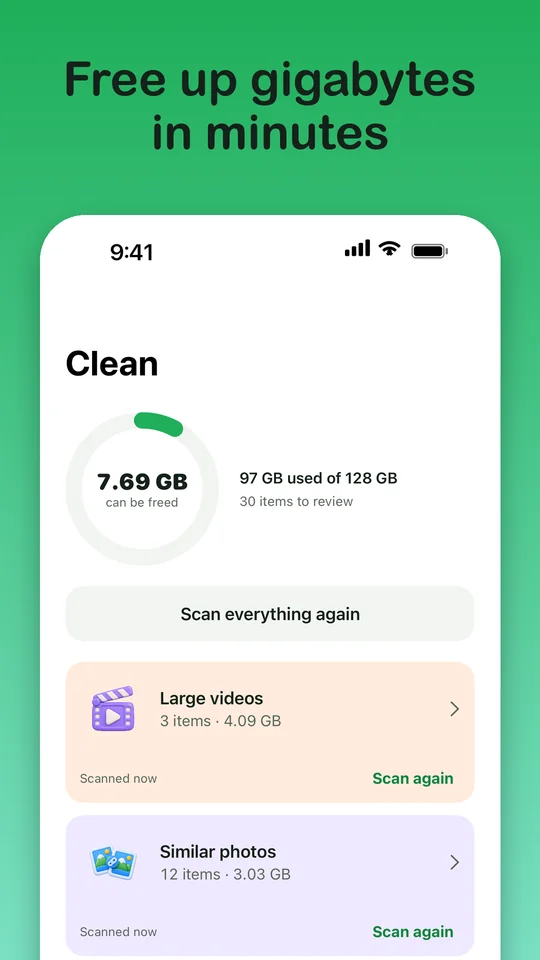

See what is filling your phone, then clear it your way.
Four steps, from install to space.
One thing to do at each step.
-
First step
Install Floosh
Free to download. No account, no sign-up.
Needs iOS 17 or newer on iPhone, or Android 11 or newer.

-
Second step
Allow access, then scan
Floosh asks to see your photo library so it can find what could go. The scan runs on your phone, so no photo is sent anywhere.
What Floosh looks for




Coming later On the way, not in the first release: Greeting cards, Receipts and QR codes, Compress video.

-
Third step
Review and swipe
Floosh shows your photos one at a time. You decide, and every swipe can be undone.
- Swipe left to toss a card into the bin.
- Swipe right to keep it.
- Swipe up to mark a favorite. Every swipe can be undone.
0 in bin5 leftThat is the deck.Nothing was deleted. This is only a demo.Drag a card, or use the buttons
A demo with sample cards. It never touches real photos.
-
Last step
Delete in one go, get the space
Check the bin, then delete everything at once. Your phone asks you to confirm, and deleted photos wait in Recently Deleted (iPhone) or Trash (Android) in case you change your mind.
Free to start. Bulk delete is free up to 1 GB, and Floosh Pro removes that limit.
Price details
Free
For as long as you like.
- Full AI scan and storage dashboard
- Unlimited swiping, no ads
- Delete through swiping and the bin, no limit
- Bulk delete from the AI categories, up to 1 GB in total
Floosh Pro
For when you want it all gone in one go.
- Everything in Free
- Unlimited bulk delete from the AI categories
Coming later Planned for a later version: video compression and more categories.
LifetimePay onceOne purchase, no renewals.RM49.90YearlyRenews automatically each year until you cancel.RM29.90No weekly plans and no monthly plans. These prices are our starting point in Malaysia and may change. The App Store or Google Play shows the real price in your currency before you buy. You can cancel a yearly plan at any time in your Apple or Google account settings.



Why it is safe
Favorites, albums and hidden photos stay off the list
Floosh never suggests a photo you marked as a favorite, a photo that sits in one of your albums, or anything in Hidden.
Swiping never deletes
A left swipe drops the photo into a bin inside Floosh. Photos only leave your library when you press Delete.
Undo, every time
Changed your mind on the last swipe, or the last twenty? Undo works for every swipe in the session.
Your photos never leave your phone
No account, no upload, no tracking.
More on safety and privacy
- iOS asks you to confirmFloosh deletes through Apple’s own system, so iOS shows its confirmation first. Floosh does not work around it.
- Recently Deleted is your safety netDeleted photos wait in Recently Deleted for about 30 days. Floosh cannot empty that folder, but it shows you how once you decide.
- No automatic deletingFloosh never deletes on a schedule or in the background. Every deletion starts with you.
- No accountNo sign-up, no email address, no password. Open the app and go.
- No ads. No tracking.Floosh has no advertising and no third-party tracking inside the app.
- Payments stay with AppleApple (or Google on Android) handles purchases. Floosh never sees your card.
Questions, answered plainly
Is Floosh free?
To use, yes. The scan, the swiping and the bin are free, with no ads. Bulk deleting from the AI categories is free up to 1 GB in total. After that it needs Floosh Pro, as a one-time purchase or a yearly plan.
Will it delete my favorites or my albums?
No. Floosh never suggests favorites, photos in your albums or hidden photos. Nothing is deleted until you press Delete and confirm in iOS.
I deleted photos but my storage did not change. Why?
Deleted photos move to Recently Deleted and keep using space for about 30 days. Open Photos, then Albums, then Recently Deleted, tap Select, then Delete All. Floosh shows these steps after every deletion. See Support for the full guide.
Are my photos uploaded anywhere?
No. Photos, thumbnails, locations and faces never leave your device, and Floosh has no account system and no server that receives them. The privacy policy explains what is stored on your phone.
Get Floosh on the App Store and Google Play.
Floosh is free to start on iPhone and Android.
Questions? Visit Support.
